

-
 files/QME-1001_dc1d58ce-6c19-4bbb-8bc2-1740e5f15f55.jpg
-
 files/QME-10_GR.jpg
-
 files/QME-10-3.jpg
-
 files/QME-10-4.jpg
-
 files/QME-10-6.jpg
-
 files/QME-10-5.jpg
-
 files/QME-10-2.jpg
-
 files/QME-10-7.jpg
-
 files/preview_images/a20c720fb3c64958b06d20d170d8ea90.thumbnail.0000000000.jpg
-
 files/preview_images/87488f75eaa142919d9a8cc1fa43487b.thumbnail.0000000000.jpg
-
 files/QME-10_-1_06faf81f-4b73-4b95-8117-36a41d4429d2.jpg
-
 files/QME-10_-1_cc3362e5-9674-4c10-bfe4-0ddcc05c27d2.jpg
-
 files/QME-10_-1_a42a5b78-4bbc-4337-9ef0-3b81d2f6bd7a.jpg
-
 files/QME-10_-1_d5a811c3-1bb1-412b-b021-3cd386cc757f.jpg
-
 files/QME-10_-1_0e8426be-3c19-4c2c-9004-40bbb25330d3.jpg
-
 files/QME-10_-1_6bd30579-3766-4376-8c71-8a4d417087c1.jpg


● White-Box-Digital-Modeling-Technologie für organischen, lebendigen Klang, IR-Unterstützung von Drittanbietern (5 Benutzer-Slots) zum Erstellen individueller, einzigartiger Sounds.
● Über 100 integrierte Gitarren-/Bass-/Akustikeffekte mit 20 legendären Verstärkermodellen, 24-Bit-44,1-kHz-Signalverarbeitung.
● 99 integrierte Drum-Rhythmen und Looper, 100 Voreinstellungen, einstellbare Signalkette mit maximal 9 gleichzeitigen Effektblöcken.
● USB-Audioschnittstelle mit Stereo-Audio-Streaming, unterstützt OTG-Funktion für die direkte Verbindung mit iOS/Android-Mobilgeräten, BT-Audioverbindung.
● Kostenlose Software für Mac/Windows/iOS/Android zur Tonbearbeitung und Voreinstellungsverwaltung. Der eingebaute Lithium-Akku ermöglicht bis zu 4 Stunden Dauerbetrieb.
Beschreibung:
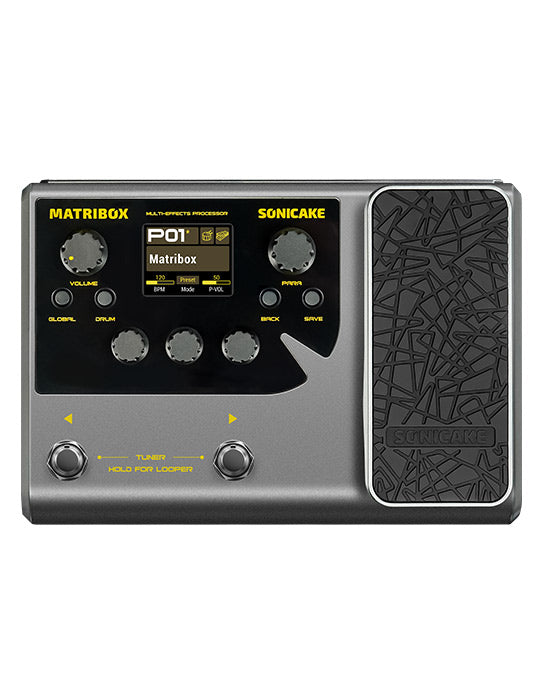
Pocket Master ist ein kompakter Multieffektprozessor mit leistungsstarkem Schaltungsdesign und hochwertigen digitalen Effekten. Er enthält über 100 verschiedene Effekte, die für unterschiedliche Musiker geeignet sind. Egal, ob Sie E-Gitarre, Akustikgitarre, Bass oder sogar Keyboard usw. spielen, er kann Ihren Spielklang attraktiver gestalten.
-------------------------------------------------------------
Treiber
Sonicake USB ASIO-Treiber V5.57.1
Neueste Firmware-Version
Pocket Master Firmware V1.3.3
Neueste Softwareversion für iOS
SONICLINK V1.3.2 (Apple Store – Suchen Sie nach „Sonicake“ / „Soniclink“ / „Pocket Master“)
Neueste Softwareversion für Android
SONICLINK V1.3.2 (Oder Google Play – Suchen Sie nach „Sonicake“ / „Soniclink“)
Neueste Softwareversion für Mac und Windows
Pocket Master Software V1.3.0 für Mac
Pocket Master Software V1.3.0 für Windows
Bedienungsanleitung
Pocket Master Benutzerhandbuch (Firmware V1.3.0)
-------------------------------------------------------------
Merkmale:
✪ Hervorragende White-Box-Digitalmodellierungstechnologie zur Erzeugung hochwertiger Töne
✪ 24-Bit 44,1 kHz Signalverarbeitung
✪ Über 100 hochwertige Effekte
✪ Bearbeitbare Effektkette
✪ 20 legendäre Gitarren-/Bass-/Akustikverstärkertypen
✪ Unterstützt die Speicherung von 5 Benutzer-IRs
✪ USB-Audio-Interface-Funktion mit Stereo-Audio-Streaming
✪ 100 Voreinstellungen (50 Werksvoreinstellungen, 50 Benutzervoreinstellungen)
✪ 99 hochwertige Schlagzeugmuster
✪ Eingebauter chromatischer Tuner
✪ Intuitiver Windows/Mac/IOS/Android-Editor
✪ 1/4" Stereo-/Kopfhörerausgänge
✪ Strombedarf: USB Typ-C, DC 5 V, Eingebaute Lithiumbatterie: 1000 mAh
Technische Daten
A/D/A-Wandler: 24 Bit
Abtastfrequenz: 44,1 kHz
SNR: 103 dB
Maximale gleichzeitige Effekte: 9
Voreinstellungsspeicher: 100 Voreinstellungsplätze, 50 Werksvoreinstellungen
Analoge Eingangsanschlüsse
- Gitarreneingang: 1/4" (6,35 mm) unsymmetrisch (TS), 1 MΩ
Analoge Ausgangsanschlüsse
- Ausgang (Kopfhörer): 1/4" (6,35 mm) Stereo (TRS), 100 Ω
Digitale Verbindungen
USB 1/2-Anschluss: USB 2.0 Typ C-Anschluss
USB-Aufzeichnungsspezifikation
Abtastrate: 44,1 kHz
Bittiefe: 16 Bit
Größe und Gewicht
Abmessungen: 103,5 mm (B) x 85 mm (T) x 28,5 mm (H)
Stückgewicht: 194 g
Leistung
Strombedarf: USB Typ C, DC 5 V
Eingebaute Lithiumbatterie: 1000 mAh
● White-Box-Digital-Modeling-Technologie für organischen, lebendigen Klang, IR-Unterstützung von Drittanbietern (5 Benutzer-Slots) zum Erstellen individueller, einzigartiger Sounds.
● Über 100 integrierte Gitarren-/Bass-/Akustikeffekte mit 20 legendären Verstärkermodellen, 24-Bit-44,1-kHz-Signalverarbeitung.
● 99 integrierte Drum-Rhythmen und Looper, 100 Voreinstellungen, einstellbare Signalkette mit maximal 9 gleichzeitigen Effektblöcken.
● USB-Audioschnittstelle mit Stereo-Audio-Streaming, unterstützt OTG-Funktion für die direkte Verbindung mit iOS/Android-Mobilgeräten, BT-Audioverbindung.
● Kostenlose Software für Mac/Windows/iOS/Android zur Tonbearbeitung und Voreinstellungsverwaltung. Der eingebaute Lithium-Akku ermöglicht bis zu 4 Stunden Dauerbetrieb.
Beschreibung:
Pocket Master ist ein kompakter Multieffektprozessor mit leistungsstarkem Schaltungsdesign und hochwertigen digitalen Effekten. Er enthält über 100 verschiedene Effekte, die für unterschiedliche Musiker geeignet sind. Egal, ob Sie E-Gitarre, Akustikgitarre, Bass oder sogar Keyboard usw. spielen, er kann Ihren Spielklang attraktiver gestalten.
-------------------------------------------------------------
Treiber
Sonicake USB ASIO-Treiber V5.57.1
Neueste Firmware-Version
Pocket Master Firmware V1.3.3
Neueste Softwareversion für iOS
SONICLINK V1.3.2 (Apple Store – Suchen Sie nach „Sonicake“ / „Soniclink“ / „Pocket Master“)
Neueste Softwareversion für Android
SONICLINK V1.3.2 (Oder Google Play – Suchen Sie nach „Sonicake“ / „Soniclink“)
Neueste Softwareversion für Mac und Windows
Pocket Master Software V1.3.0 für Mac
Pocket Master Software V1.3.0 für Windows
Bedienungsanleitung
Pocket Master Benutzerhandbuch (Firmware V1.3.0)
-------------------------------------------------------------
Merkmale:
✪ Hervorragende White-Box-Digitalmodellierungstechnologie zur Erzeugung hochwertiger Töne
✪ 24-Bit 44,1 kHz Signalverarbeitung
✪ Über 100 hochwertige Effekte
✪ Bearbeitbare Effektkette
✪ 20 legendäre Gitarren-/Bass-/Akustikverstärkertypen
✪ Unterstützt die Speicherung von 5 Benutzer-IRs
✪ USB-Audio-Interface-Funktion mit Stereo-Audio-Streaming
✪ 100 Voreinstellungen (50 Werksvoreinstellungen, 50 Benutzervoreinstellungen)
✪ 99 hochwertige Schlagzeugmuster
✪ Eingebauter chromatischer Tuner
✪ Intuitiver Windows/Mac/IOS/Android-Editor
✪ 1/4" Stereo-/Kopfhörerausgänge
✪ Strombedarf: USB Typ-C, DC 5 V, Eingebaute Lithiumbatterie: 1000 mAh
Technische Daten
A/D/A-Wandler: 24 Bit
Abtastfrequenz: 44,1 kHz
SNR: 103 dB
Maximale gleichzeitige Effekte: 9
Voreinstellungsspeicher: 100 Voreinstellungsplätze, 50 Werksvoreinstellungen
Analoge Eingangsanschlüsse
- Gitarreneingang: 1/4" (6,35 mm) unsymmetrisch (TS), 1 MΩ
Analoge Ausgangsanschlüsse
- Ausgang (Kopfhörer): 1/4" (6,35 mm) Stereo (TRS), 100 Ω
Digitale Verbindungen
USB 1/2-Anschluss: USB 2.0 Typ C-Anschluss
USB-Aufzeichnungsspezifikation
Abtastrate: 44,1 kHz
Bittiefe: 16 Bit
Größe und Gewicht
Abmessungen: 103,5 mm (B) x 85 mm (T) x 28,5 mm (H)
Stückgewicht: 194 g
Leistung
Strombedarf: USB Typ C, DC 5 V
Eingebaute Lithiumbatterie: 1000 mAh
- Normaler Preis
- $64.99